import time
import numpy as np

size_of_vec = 1000

def pure_python_version():
    t1 = time.time()
    X = range(size_of_vec)
    Y = range(size_of_vec)
    Z = [X[i] + Y[i] for i in range(len(X)) ]
    return time.time() - t1

def numpy_version():
    t1 = time.time()
    X = np.arange(size_of_vec)
    Y = np.arange(size_of_vec)
    Z = X + Y
    return time.time() - t1


t1 = pure_python_version()
t2 = numpy_version()
print(t1, t2)
print("Numpy is in this example " + str(t1/t2) + " faster!")
结果如下:
0.00048732757568359375 0.0002491474151611328
Numpy is in this example 1.955980861244019 faster!
# Python实用宝典
# 2021/07/19
from ciphey.__main__ import main, main_decrypt, make_default_config
main_decrypt(make_default_config("SGVsbG8gbXkgbmFtZSBpcyBiZWUgYW5kIEkgbGlrZSBkb2cgYW5kIGFwcGxlIGFuZCB0cmVl"))
# >> Hello my name is bee and I like dog and apple and tree
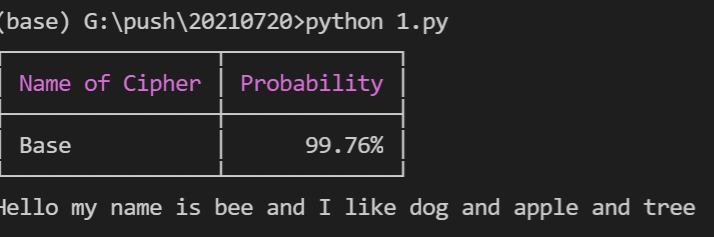
运行后会输出如下的结果:
效果还是相当不错的,如果你不想输出概率表,只想要解密内容,代码需要这么写:
# Python实用宝典
# 2021/07/19
from ciphey.__main__ import main, main_decrypt, make_default_config
config = make_default_config("SGVsbG8gbXkgbmFtZSBpcyBiZWUgYW5kIEkgbGlrZSBkb2cgYW5kIGFwcGxlIGFuZCB0cmVl")
config["grep"] = True
main_decrypt(config)
# >> Hello my name is bee and I like dog and apple and tree
非常Nice,你根本无需知道这是什么编码。
Ciphey 支持解密的密文和编码多达51种,下面列出一些基本的选项
基本密码:
Caesar Cipher
ROT47 (up to ROT94 with the ROT47 alphabet)
ASCII shift (up to ROT127 with the full ASCII alphabet)
Vigenère Cipher
Affine Cipher
Binary Substitution Cipher (XY-Cipher)
Baconian Cipher (both variants)
Soundex
Transposition Cipher
Pig Latin
现代密码学:
Repeating-key XOR
Single XOR
编码:
Base32
Base64
Z85 (release candidate stage)
Base65536 (release candidate stage)
ASCII
Reversed text
Morse Code
DNA codons (release candidate stage)
Atbash
Standard Galactic Alphabet (aka Minecraft Enchanting Language)
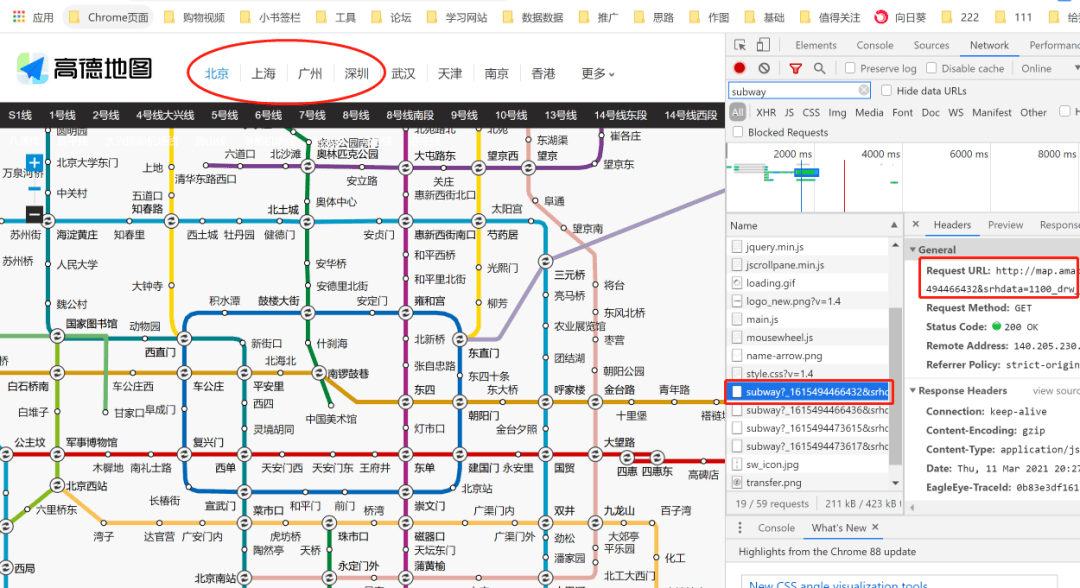
url = 'http://map.amap.com/service/subway?_1615466846985&srhdata=1100_drw_beijing.json'
response = requests.get(url)
result = json.loads(response.text)
stations = []
for i in result['l']:
    station = []
    for a in i['st']:
        station.append([float(b) for b in a['sl'].split(',')])
    stations.append(station)
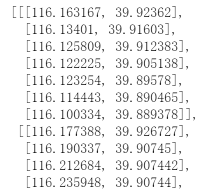
pprint.pprint(stations)
import matplotlib.pyplot as plt
import seaborn as sns
sns.set(style='darkgrid',font_scale=1.3)
plt.rcParams['font.family']='SimHei'
plt.rcParams['axes.unicode_minus']=False
6.1.3 特征工程
import sklearn
from sklearn import preprocessing                            #数据预处理模块
from sklearn.preprocessing import LabelEncoder               #编码转换
from sklearn.preprocessing import StandardScaler             #归一化
from sklearn.model_selection import StratifiedShuffleSplit   #分层抽样
from sklearn.model_selection import train_test_split         #数据分区
from sklearn.decomposition import PCA                        #主成分分析 (降维)
6.1.4 分类算法
from sklearn.ensemble import RandomForestClassifier     #随机森林
from sklearn.svm import SVC,LinearSVC                   #支持向量机
from sklearn.linear_model import LogisticRegression     #逻辑回归
from sklearn.neighbors import KNeighborsClassifier      #KNN算法
from sklearn.cluster import KMeans                     #K-Means 聚类算法
from sklearn.naive_bayes import GaussianNB              #朴素贝叶斯
from sklearn.tree import DecisionTreeClassifier         #决策树
6.1.5 分类算法–集成学习
import xgboost as xgb
from xgboost import XGBClassifier
from catboost import CatBoostClassifier
from sklearn.ensemble import AdaBoostClassifier
from sklearn.ensemble import GradientBoostingClassifier
6.1.6 模型评估
from sklearn.metrics import classification_report,precision_score,recall_score,f1_score  #分类报告
from sklearn.metrics import confusion_matrix           #混淆矩阵
from sklearn.metrics import silhouette_score           #轮廓系数(评价k-mean聚类效果)
from sklearn.model_selection import GridSearchCV       #交叉验证
from sklearn.metrics import make_scorer
from sklearn.ensemble import VotingClassifier          #投票
plt.figure(figsize=(15,6))
df_onehot.corr()['Churn'].sort_values(ascending=False).plot(kind='bar')
plt.title('Correlation between Churn  and variables ')
print('ka_var列表中的维度与Churn交叉分析结果如下:','\n')
for i in kf_var:
    print('................Churn BY {}...............'.format(i))
    print(pd.crosstab(df['Churn'],df[i],normalize=0),'\n') #交叉分析,同行百分比
#自定义齐性检验 & 方差分析 函数 defANOVA(x): li_index=list(df['Churn'].value_counts().keys()) args=[] for i in li_index: args.append(df[df['Churn']==i][x]) w,p=stats.levene(*args) #齐性检验 if p<0.05: print('警告:Churn BY {}的P值为{:.2f},小于0.05,表明齐性检验不通过,不可作方差分析'.format(x,p),'\n') else: f,p_value=stats.f_oneway(*args) #方差分析 print('Churn BY {} 的f值是{},p_value值是{}'.format(x,f,p_value),'\n') if p_value<0.05: print('Churn BY {}的均值有显著性差异,可进行均值比较'.format(x),'\n') else: print('Churn BY {}的均值无显著性差异,不可进行均值比较'.format(x),'\n')
deflabelencode(x): churn_var[x] = LabelEncoder().fit_transform(churn_var[x]) for i in range(0,len(df_object.columns)): labelencode(df_object.columns[i]) print(list(map(Label,df_object.columns)))
Churn by MonthlyCharges 的卡方临界值是0.00,小于0.05,表明MonthlyCharges组间有显著性差异,可进行【交叉分析】
Churn by TotalCharges 的卡方临界值是0.00,小于0.05,表明TotalCharges组间有显著性差异,可进行【交叉分析】
交叉分析
for i in ['MonthlyCharges','TotalCharges']:
    print('................Churn BY {}...............'.format(i))
    print(pd.crosstab(df['Churn'],df[i],normalize=0),'\n')
import csv
import os
import random
import re
import time

import dateutil.parser as dparser
from random import choice
from selenium import webdriver
from selenium.webdriver.common.by import By
from selenium.webdriver.support import expected_conditions as EC
from selenium.webdriver.support.ui import WebDriverWait
from selenium.webdriver.chrome.options import Options
import csv
import os
import random
import re
import time
import threading

import dateutil.parser as dparser
from random import choice
from selenium import webdriver
from selenium.common.exceptions import TimeoutException
from selenium.webdriver.common.by import By
from selenium.webdriver.support import expected_conditions as EC
from selenium.webdriver.support.ui import WebDriverWait
from selenium.webdriver.chrome.options import Options
import csv
import os
import random
import re
import time


import dateutil.parser as dparser
from random import choice
from multiprocessing import Pool
from selenium import webdriver
from selenium.webdriver.common.by import By
from selenium.webdriver.support import expected_conditions as EC
from selenium.webdriver.support.ui import WebDriverWait
from selenium.webdriver.chrome.options import Options
# my global config
global:
  scrape_interval:     15s # Set the scrape interval to every 15 seconds. Default is every 1 minute.
  evaluation_interval: 15s # Evaluate rules every 15 seconds. The default is every 1 minute.
  # scrape_timeout is set to the global default (10s).

# Alertmanager configuration
alerting:
  alertmanagers:
  - static_configs:
    - targets:
      # - alertmanager:9093

# Load rules once and periodically evaluate them according to the global 'evaluation_interval'.
rule_files:
  # - "first_rules.yml"
  # - "second_rules.yml"

# A scrape configuration containing exactly one endpoint to scrape:
# Here it's Prometheus itself.
scrape_configs:
  # The job name is added as a label `job=<job_name>` to any timeseries scraped from this config.
  - job_name: 'prometheus'

    # metrics_path defaults to '/metrics'
    # scheme defaults to 'http'.

    static_configs:
    - targets: ['localhost:9090']

   # 主要是新增了node_exporter的job,如果有多个node_exporter,在targets数组后面加即可

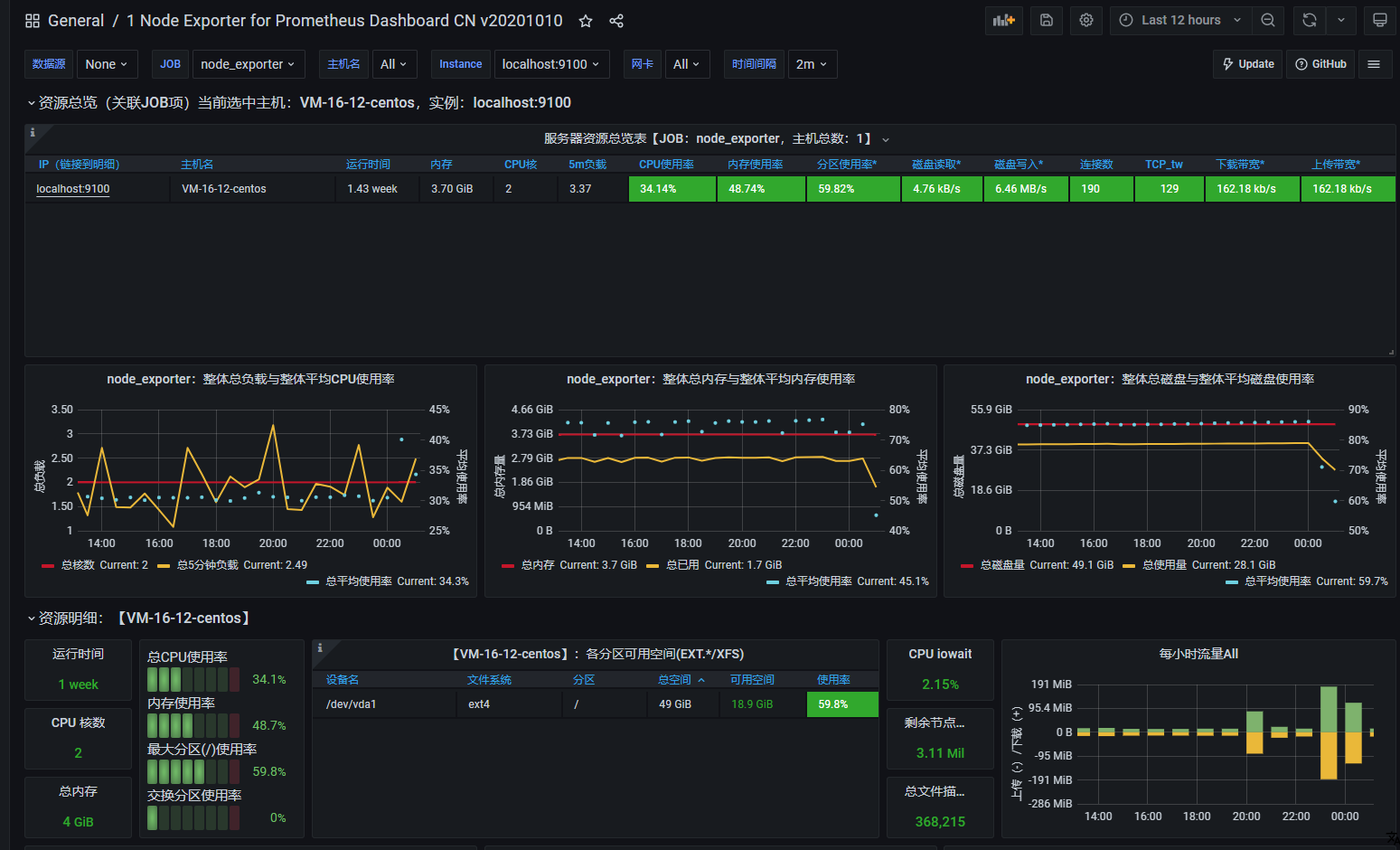
  - job_name: 'node_exporter'
    static_configs:
      - targets: ['localhost:9100']
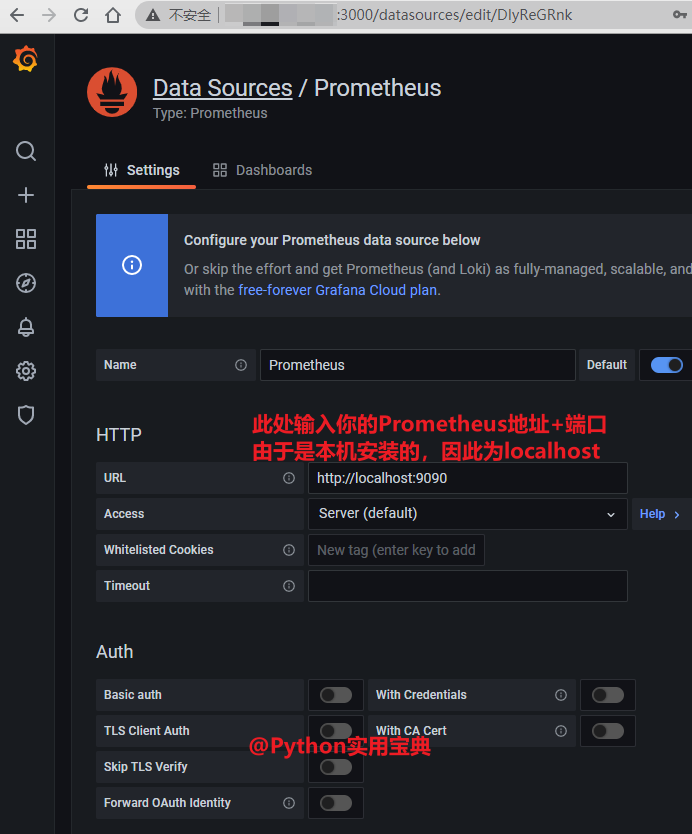
#(CentOS) vim /data/prometheus/conf/prometheus.yaml
vim /data/prometheus/conf/prometheus.yml # ubuntu
配置如下:
# my global config
global:
  scrape_interval:     15s # Set the scrape interval to every 15 seconds. Default is every 1 minute.
  evaluation_interval: 15s # Evaluate rules every 15 seconds. The default is every 1 minute.
  # scrape_timeout is set to the global default (10s).

# Alertmanager configuration
alerting:
  alertmanagers:
  - static_configs:
    - targets:
      # - alertmanager:9093

# Load rules once and periodically evaluate them according to the global 'evaluation_interval'.
rule_files:
  # - "first_rules.yml"
  # - "second_rules.yml"

# A scrape configuration containing exactly one endpoint to scrape:
# Here it's Prometheus itself.
scrape_configs:
  # The job name is added as a label `job=<job_name>` to any timeseries scraped from this config.
  - job_name: 'prometheus'

    # metrics_path defaults to '/metrics'
    # scheme defaults to 'http'.

    static_configs:
    - targets: ['localhost:9090']

   # 主要是新增了node_exporter的job,如果有多个node_exporter,在targets数组后面加即可
  - job_name: 'node_exporter'
    static_configs:
      - targets: ['localhost:9100']

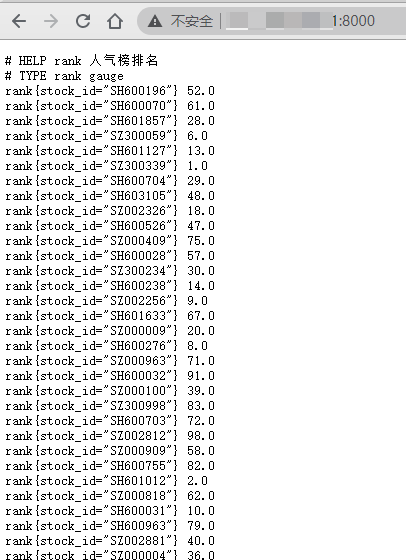
   # 新增我们的Python股票采集脚本
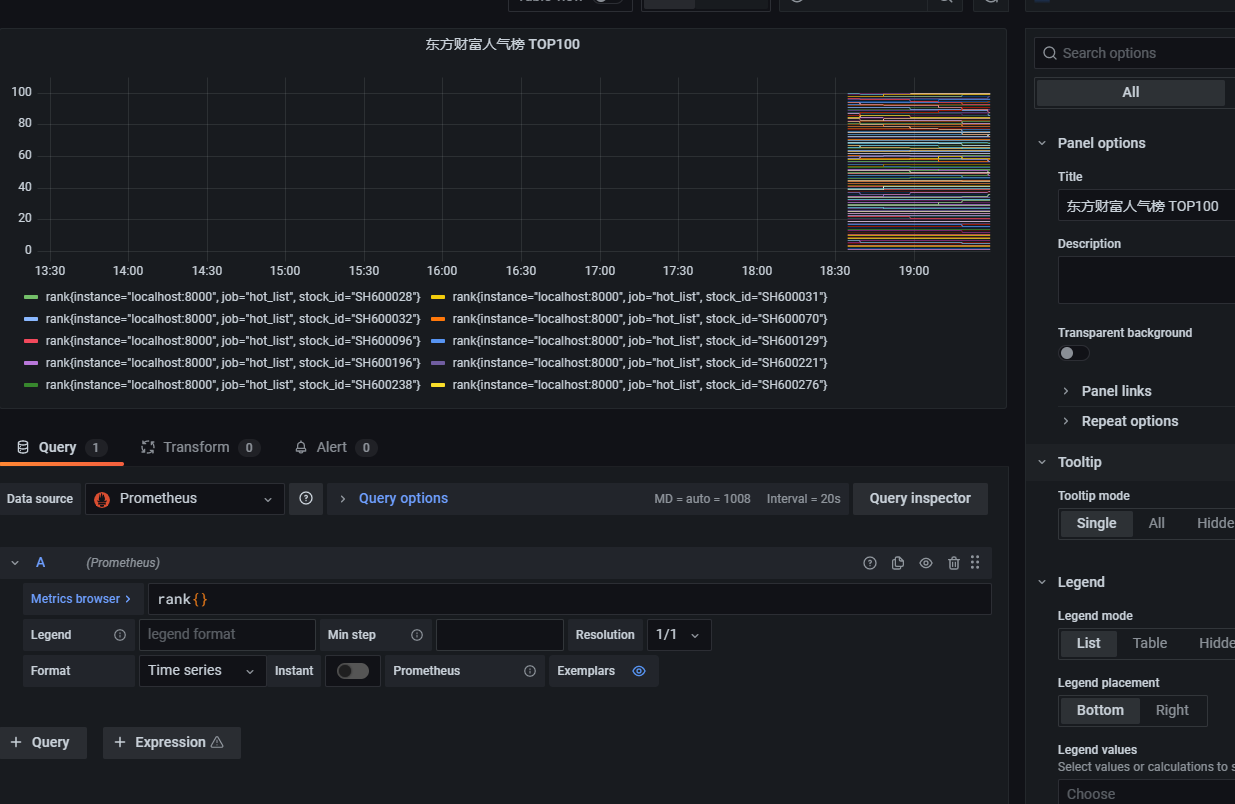
  - job_name: 'hot_list'
    static_configs:
      - targets: ['localhost:8000']

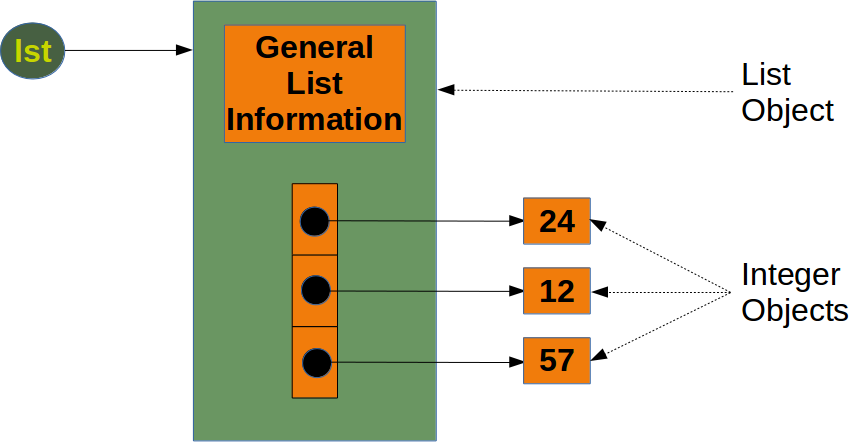

























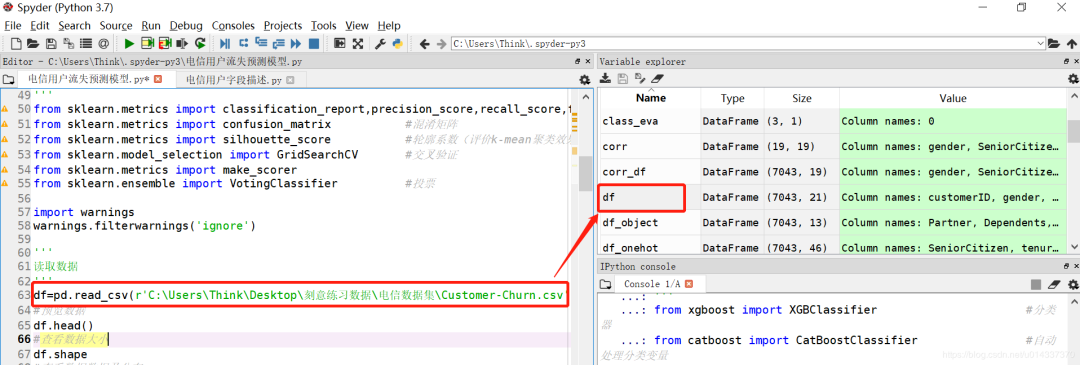 查看该数据集的详情。
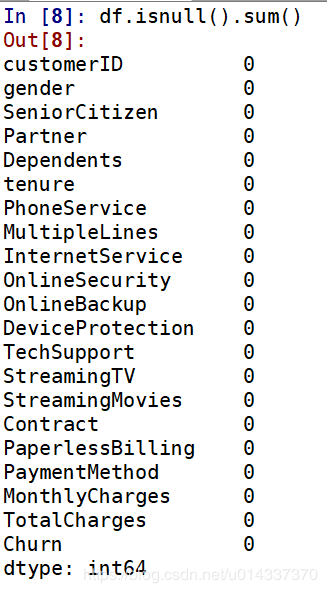

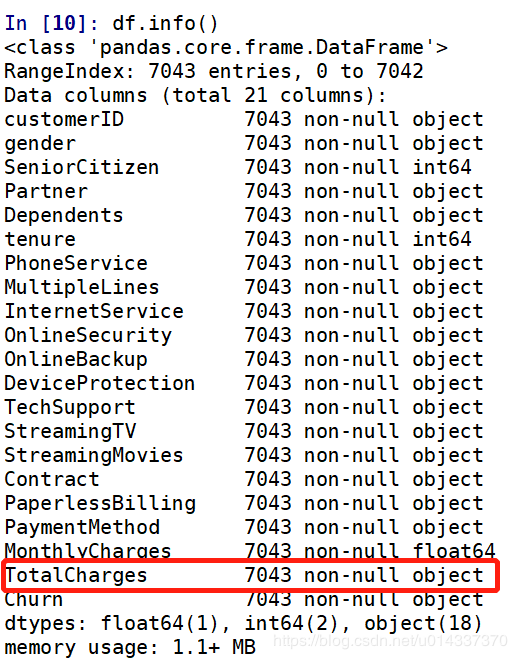
 再次查看缺失值:
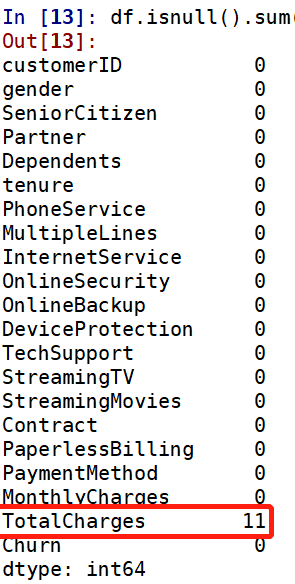 TotalCharges列有11个缺失值,处理缺失值的原则是尽量填充,最后才是删除。
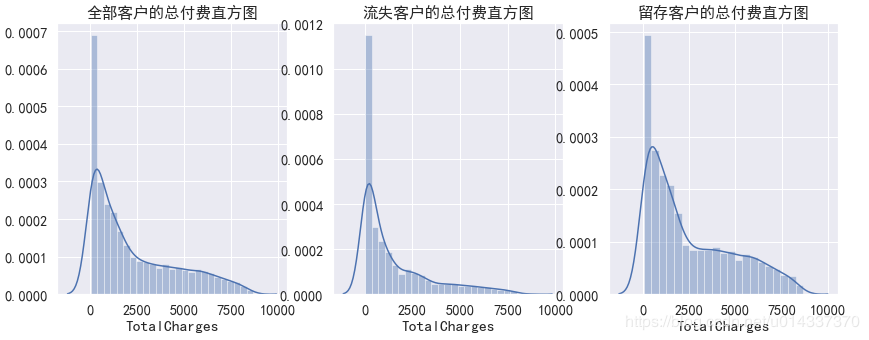 从三个直方图看,该列数据是偏态分布,故选择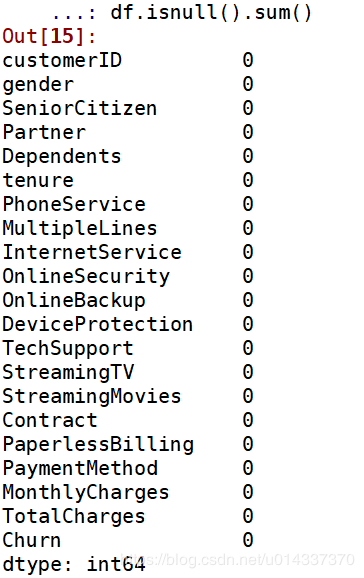
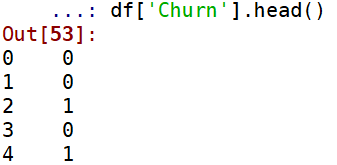 绘制饼图,查看流失客户占比。
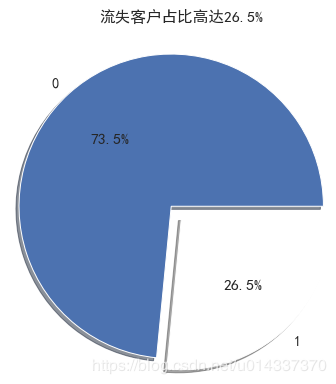 【分析】:流失客户样本占比26.5%,留存客户样本占比73.5%,明显的“样本不均衡”。
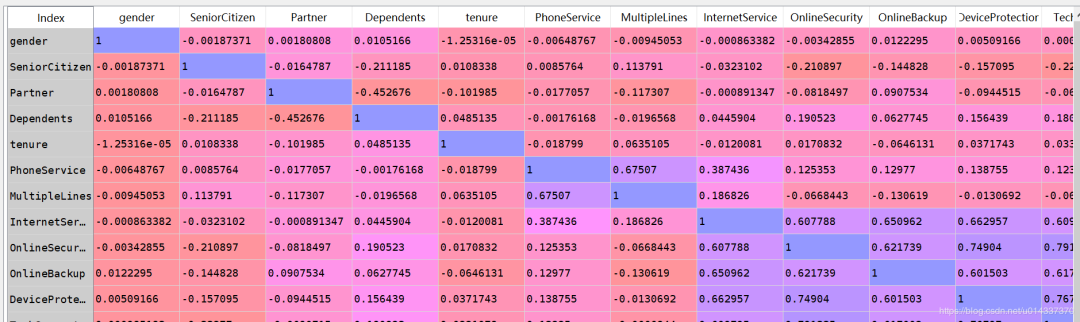 相关性矩阵可视化
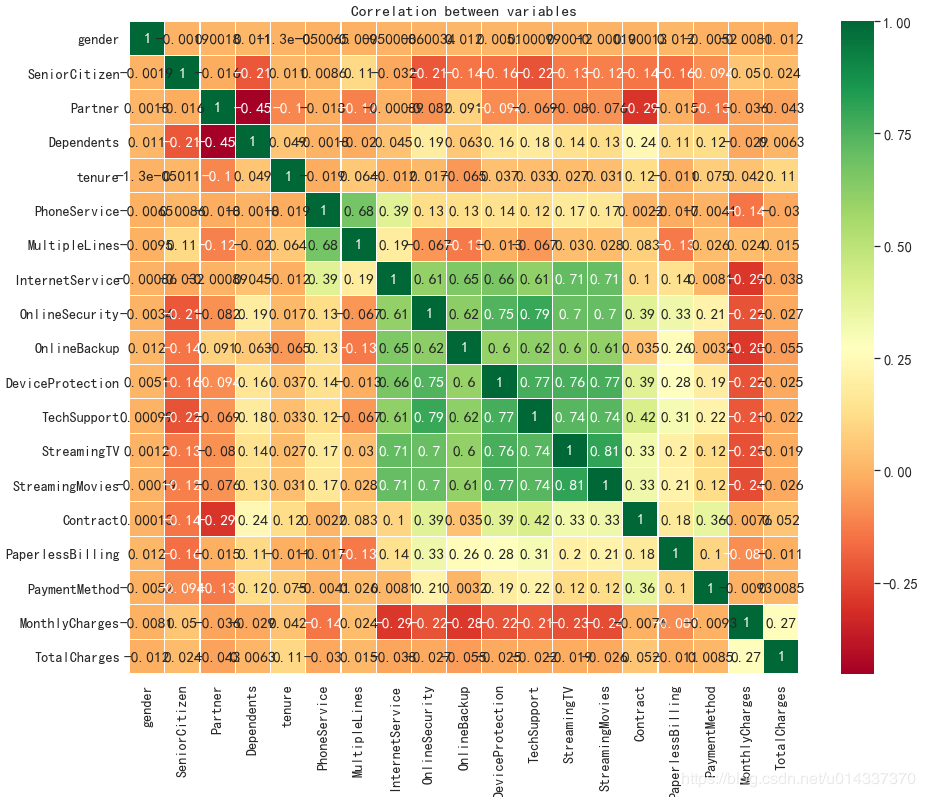 【分析】:从热力图来看,互联网服务、网络安全、在线备份、设备维护服务、技术支持服务、开通网络电视服务、开通网络电影之间相关性很强,且是正相关。电话服务和多线业务之间也存在很强的正相关关系。
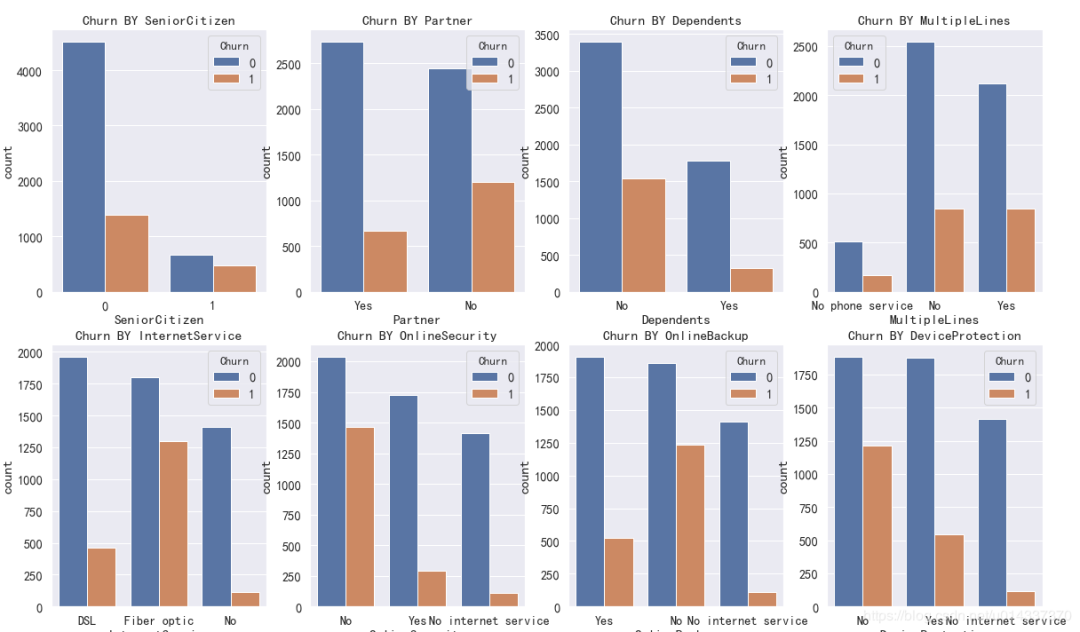
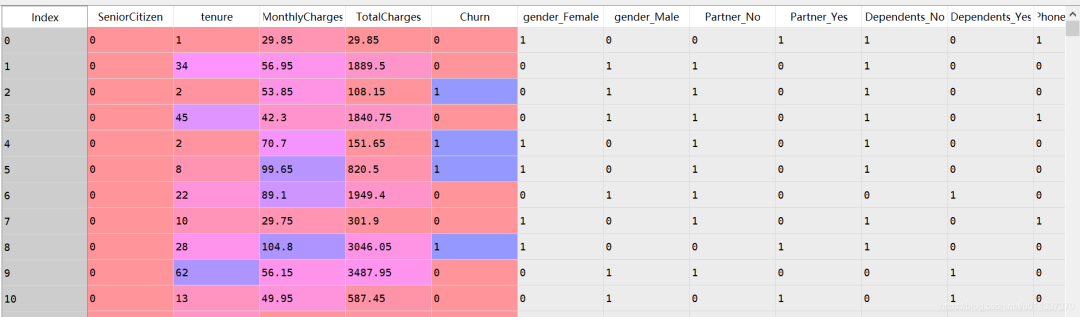 绘图查看用户流失(‘Churn’)与各个维度之间的关系
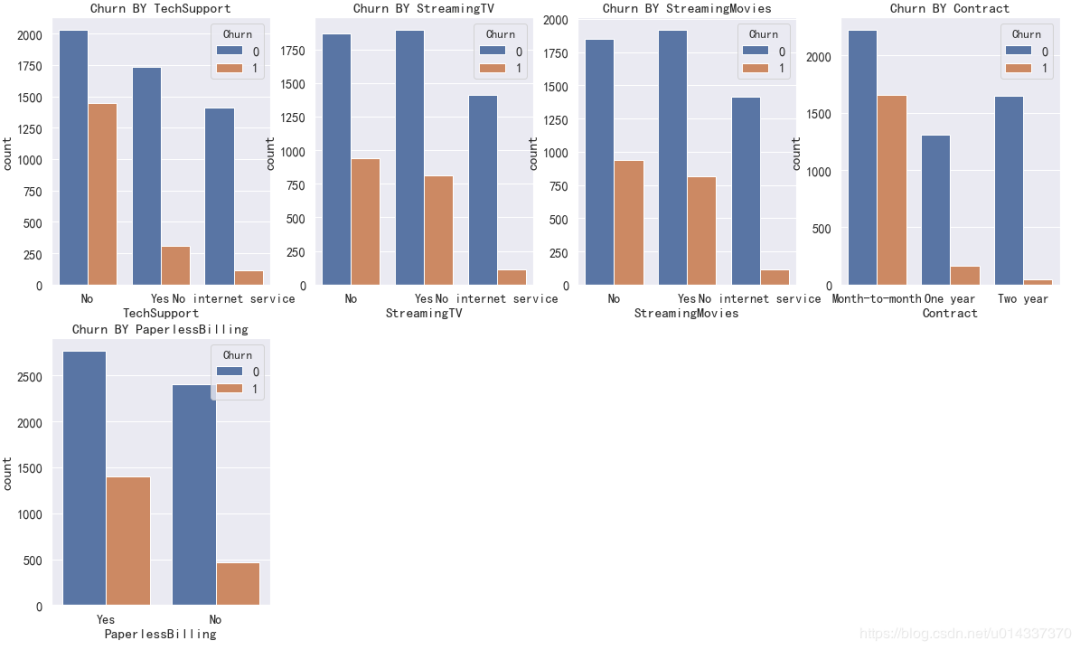
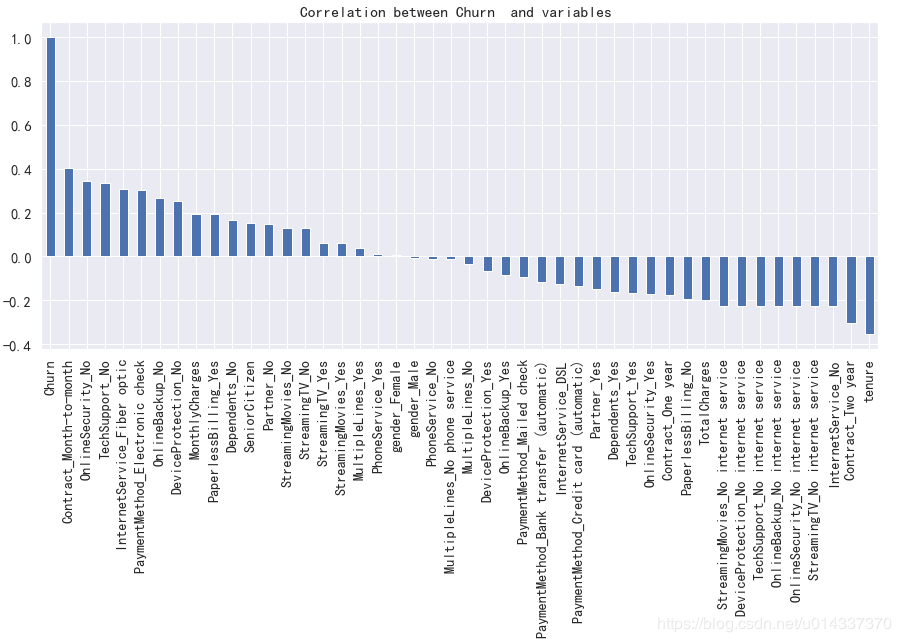 【分析】:从图看gender(性别)、PhoneService(电话服务)相关性几乎为0,故两个维度可以忽略。[‘SeniorCitizen’,’Partner’,’Dependents’, ‘Contract’,MultipleLines,’InternetService’, ‘OnlineSecurity’, ‘OnlineBackup’, ‘DeviceProtection’,’TechSupport’, ‘StreamingTV’, ‘StreamingMovies’,’PaperlessBilling’,’PaymentMethod’]等都有较高的相关性,将以上维度合并成一个列表kf_var,然后进行频数比较。
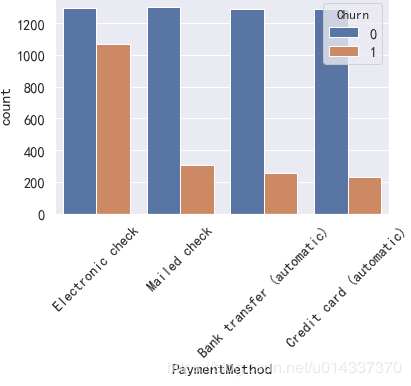
 因为PaymentMethod的标签比较长,影响看图,所以单独画。
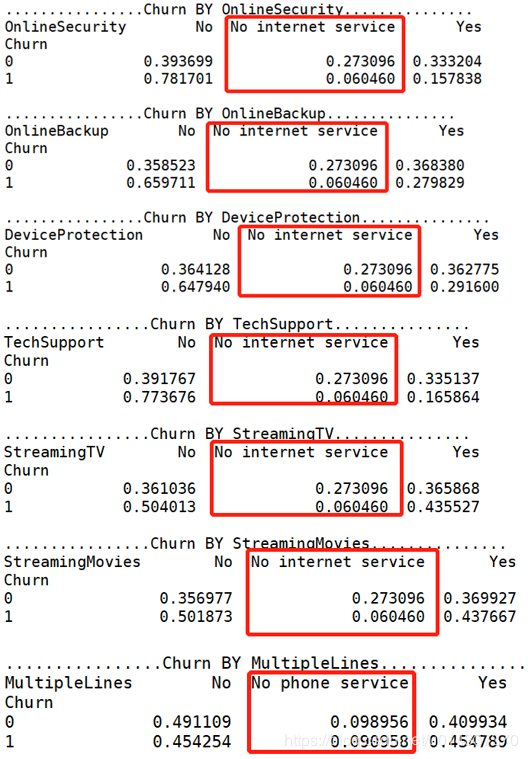
 可以直接从柱形图去判断对哪个维度对流失客户的影响大吗?不能,因为“样本不均衡”(流失客户样本占比26.5%,留存客户样本占比73.5%),基数不一样,故不能直接通过“频数”的柱形图去分析。
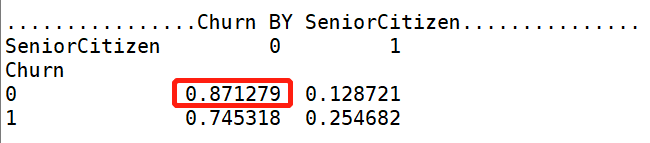 【SeniorCitizen 分析】:年轻用户 在流失、留存,两个标签的人数占比都高。
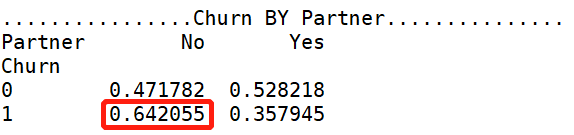 【Parter 分析】:单身用户更容易流失。
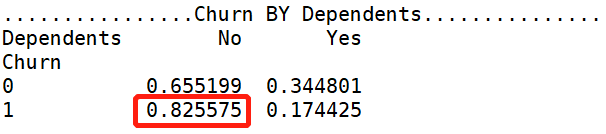 【Denpendents 分析】:经济不独立的用户更容易流失。
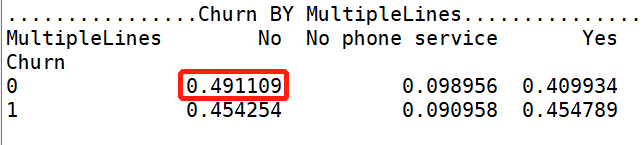 【MultipleLines 分析】:是否开通MultipleLines,对留存和流失都没有明显的促进作用。
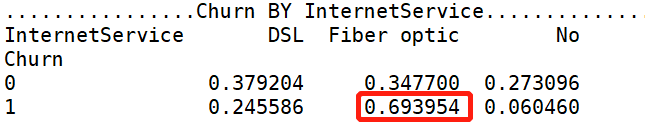 【InternetService 分析】:办理了 “Fiber optic 光纤网络”的客户容易流失。
 【OnlineSecurity 分析】:没开通“网络安全服务”的客户容易流失。
 【OnlineBackup 分析】:没开通“在线备份服务”的客户容易流失。
 【DeviceProtection 分析】:没开通“设备保护业务”的用户比较容易流失
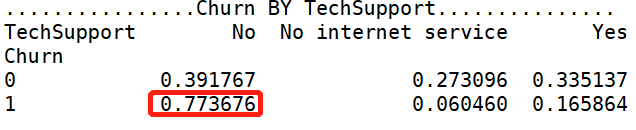 【TechSupport 分析】:没开通“技术支持服务”的用户容易流失。
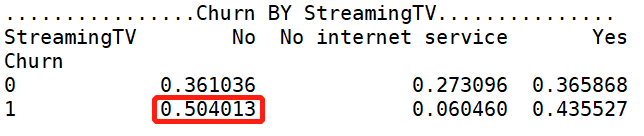 【StreamingTV 分析】:是否开通“网络电视”服务,对用户留存、流失,没有明显的促进作用。
 【StreamingMovies 分析】:是否开通“网络电影”服务,对用户留存、流失,没有明显的促进作用。
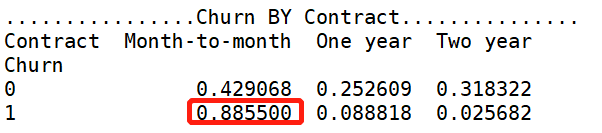 【Contract 分析】逐月签订合同的用户最容易流失。
 【分析】使用“电子支票”支付的人更容易流失。
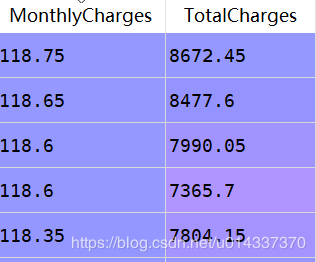 处理量纲差异大,有两种方法: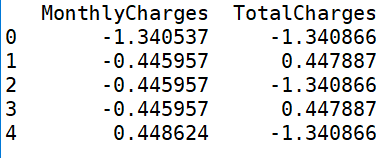
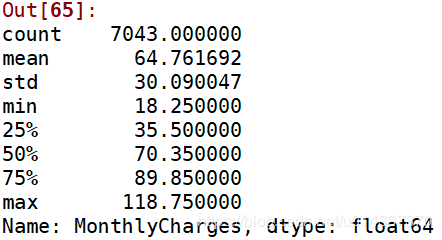 离散操作
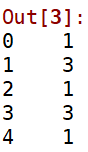
离散操作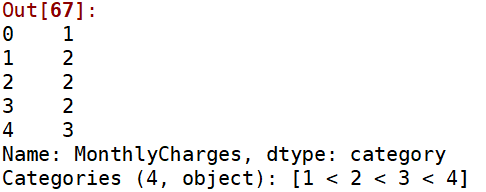 2、处理’TotalCharges’:
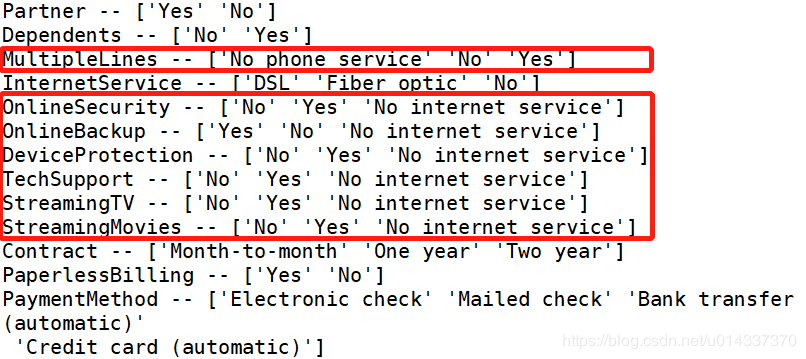
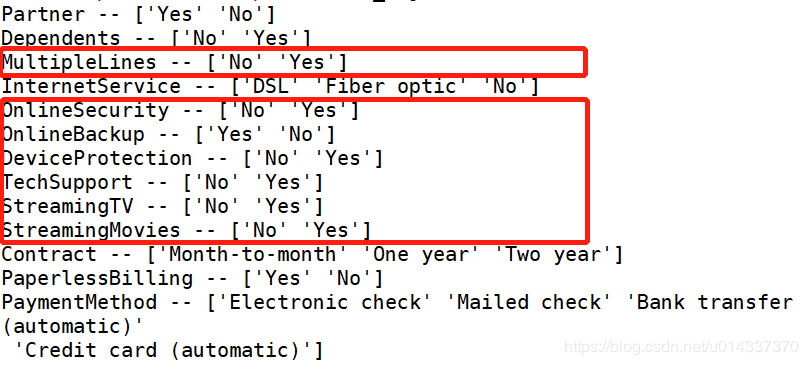
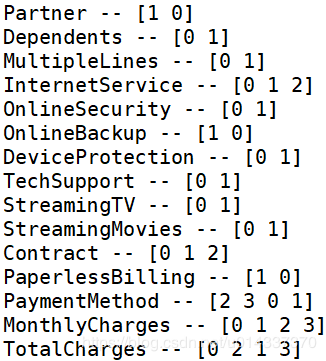


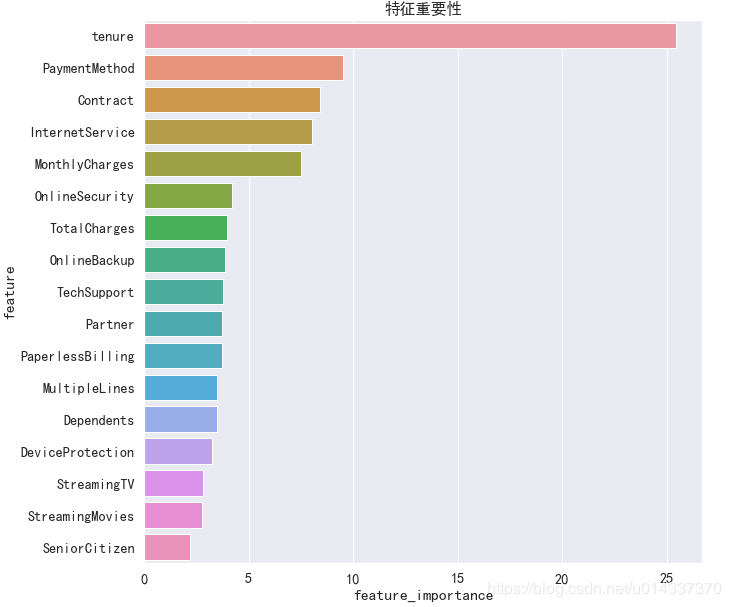 -XGB 算法
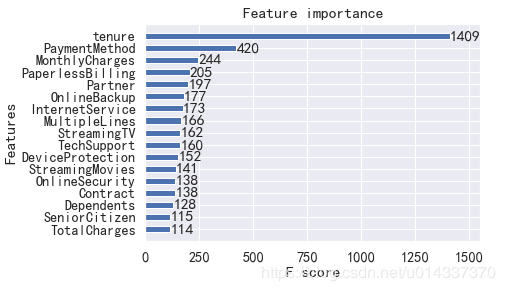
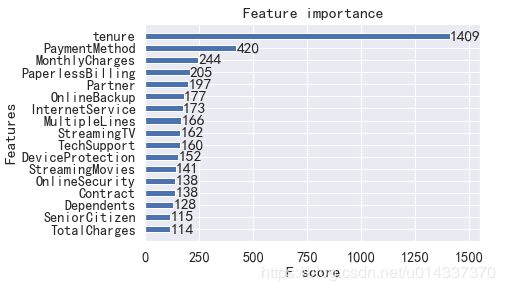 由于 XGB算法精度得分最高,故我们以XGB得到的“特征重要性”进行分析。
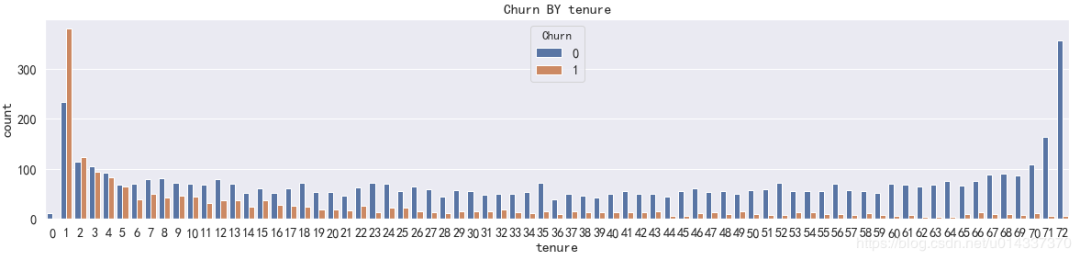 【分析】
【分析】 18.25=<churn_var[‘MonthlyCharges’]<=35.5,标记 “1”
 18=<churn_var[‘TotalCharges’]<=402,标记 “1”
 【分析】
【分析】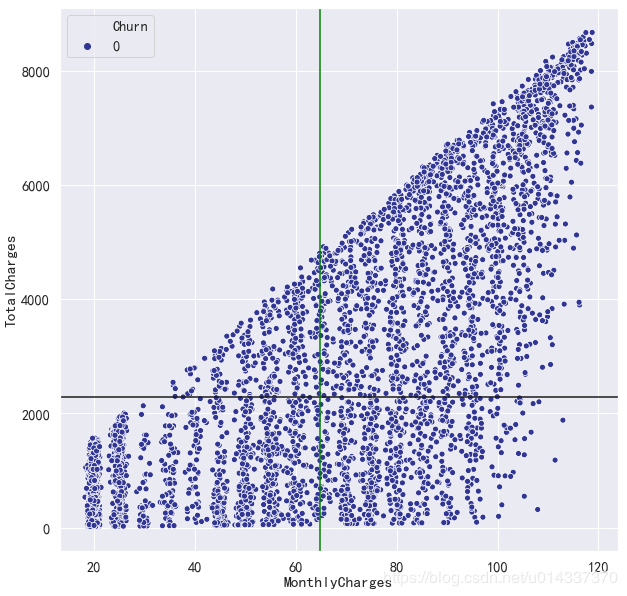 【结论】
【结论】
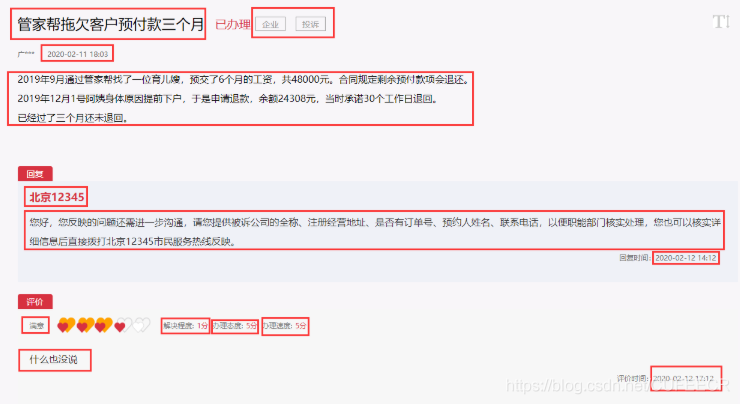 对于图中标出的数据,均要进行爬取,以此构成一条留言的组成部分。
 每次需要进行点击向下加载,所以要模拟点击的操作,向下滑动,等完全加载后再次点击,直到底部。函数返回值时,不是一次返回一个列表,而是通过yield关键字生成生成器,按照程序执行的进度生成url,可以减少内存的压力。









 显然,整个运行时间将近5小时,效率相对较低,有很大的提升空间。最终得到了合并的DATA.csv: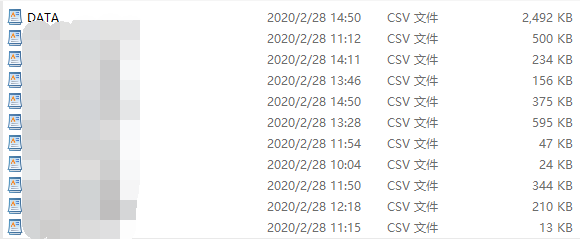
 每次需要进行点击向下加载,所以要模拟点击的操作,向下滑动,等完全加载后再次点击,直到底部,有可能会滑倒页面最底部不再显示按钮或者由于被反爬或网络不好而未加载出来,此时定位元素会超时,增加异常处理,递归调用。函数返回值时,不是一次返回一个列表,而是通过yield关键字生成生成器,按照程序执行的进度生成url,可以减少内存的压力。









 运行时间缩短到不到1小时半左右,约等于第一篇单线程的三分之一,因为同一时刻有3个子线程执行,大大降低了运行时间,效率比之前提高很多,加入多线程之后,可以让运行时间较长和较短的相互补充,同时多个线程同时运行,在同一时刻爬取多个领导,很显然大大缩短了运行时间。最后得到了合并的DATA.csv:
 可以进一步总结多线程的优势 :
 每次需要进行点击向下加载,所以要模拟点击的操作,向下滑动,等完全加载后再次点击,直到底部,有可能会滑倒页面最底部不再显示按钮或者由于被反爬或网络不好而未加载出来,此时定位元素会超时,增加异常处理,递归调用。









 运行时间缩短到不到100分钟,与单进程相比大大缩短了时间、提高了效率,因为同一时刻有3个子进程执行。加入多进程之后,可以让运行时间较长和较短的相互补充,在任意时刻多个进程同时运行。但是也可以看出来与多线程相比,多进程的运行时间相对稍长,虽然差别不大,但是这可能就是性能的瓶颈。可能的原因是进程需要的资源更多,这对内存、CPU和网络的要求更高,从而对设备提出了更高的要求,有时可能设备性能跟不上程序要求,从而降低了效率。
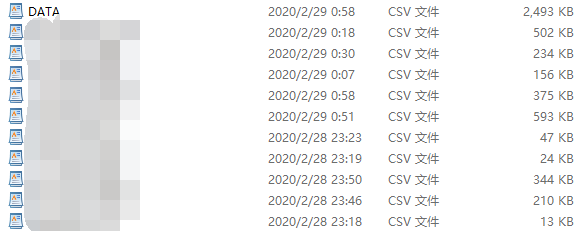 对于多线程和多进程的简单对比分析如下: