问题:如何在Vim中注释掉Python代码块
我想知道Vim中是否有任何键映射可以让我缩进某些代码行(无论这些行是在可视模式下选择的,还是在当前光标位置上方/下方的n行)。
所以基本上是可以转换以下内容的东西
def my_fun(x, y):
    return x + y
至
#def my_fun(x, y):
#    return x + y
我可以使用#或"""注释掉相关行。理想情况下,如果给定的行已被注释掉,我也希望使用相同的键盘映射来取消注释。
I was wondering if there was any key mapping in Vim to allow me to indent certain lines of code (whether those lines have been selected in visual mode, or n lines above/below current cursor position).
So basically something that converts the following
def my_fun(x, y):
    return x + y
to
#def my_fun(x, y):
#    return x + y
I am okay with using either # or """ for commenting out the relevant lines. Ideally, I would also like the same keymapping to uncomment the lines if the given lines have been commented out.
回答 0
步骤1:转到要评论的第一行的第一列。
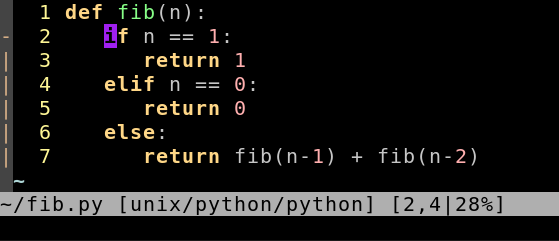
步骤2:按:Ctrl+,v然后选择要注释的行:
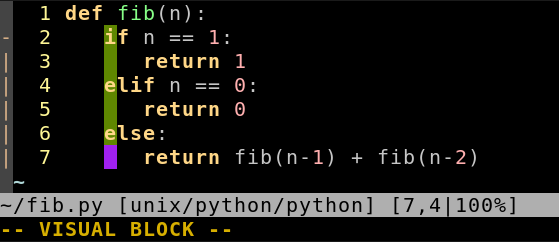
步骤3: Shift – I#space(进入插入-在左模式,键入字符插入的选择将消失,但在其内的所有线将在步骤4之后进行修改)
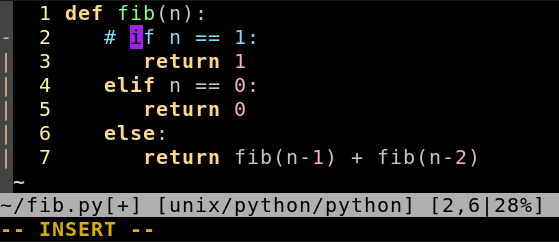
第4步: Esc
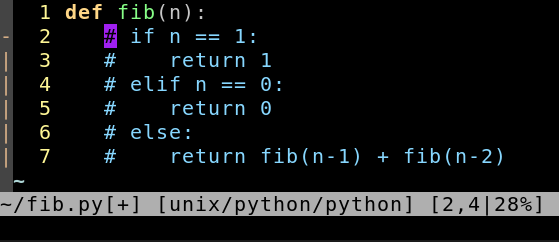
Step 1: Go to the the first column of the first line you want to comment.
Step 2: Press: Ctrl+v and select the lines you want to comment:
Step 3: Shift–I#space (Enter Insert-at-left mode, type chars to insert. The selection will disappear, but all lines within it will be modified after Step 4.)
Step 4: Esc
回答 1
手动方式
:set number
:10,12s/^/#
one way manually
:set number
:10,12s/^/#
回答 2
您可以将以下映射添加到您的.vimrc中
vnoremap <silent> # :s/^/#/<cr>:noh<cr>
vnoremap <silent> -# :s/^#//<cr>:noh<cr>
突出显示您的方块:
Shift+v
# 在第一列中注释您的行。
-# 以相同的方式取消注释。
You could add the following mapping to your .vimrc
vnoremap <silent> # :s/^/#/<cr>:noh<cr>
vnoremap <silent> -# :s/^#//<cr>:noh<cr>
Highlight your block with:
Shift+v
# to comment your lines from the first column.
-# to uncomment the same way.
回答 3
突出显示您的方块: ShiftV
用以下方式注释掉选定的块:(:norm i#小写i)
要取消注释,请再次突出显示您的方块,并取消注释: :norm ^x
该:norm命令为每个选定的行执行一个动作。注释将#在每行的开头插入一个,而注释不删除将删除该行#。
Highlight your block with: ShiftV
Comment the selected block out with: :norm i# (lower case i)
To uncomment, highlight your block again, and uncomment with: :norm ^x
The :norm command performs an action for every selected line. Commenting will insert a # at the start of every line, and uncommenting will delete that #.
回答 4
我通常会扫出一个可视块(<C-V>),然后搜索并用以下内容替换第一个字符:
:'<,'>s/^/#
(进入选择了可视块的命令模式后,自动在命令行上放置了“ <,”>)然后,我可以通过清除相同的可视块来取消注释该块,并:
:'<,'>s/^#//
I usually sweep out a visual block (<C-V>), then search and replace the first character with:
:'<,'>s/^/#
(Entering command mode with a visual block selected automatically places ‘<,’> on the command line) I can then uncomment the block by sweeping out the same visual block and:
:'<,'>s/^#//
回答 5
There are some good plugins to help comment/uncomment lines. For example The NERD Commenter.
回答 6
我的代码如下.vimrc:
" comment line, selection with Ctrl-N,Ctrl-N
au BufEnter *.py nnoremap  <C-N><C-N>    mn:s/^\(\s*\)#*\(.*\)/\1#\2/ge<CR>:noh<CR>`n
au BufEnter *.py inoremap  <C-N><C-N>    <C-O>mn<C-O>:s/^\(\s*\)#*\(.*\)/\1#\2/ge<CR><C-O>:noh<CR><C-O>`n
au BufEnter *.py vnoremap  <C-N><C-N>    mn:s/^\(\s*\)#*\(.*\)/\1#\2/ge<CR>:noh<CR>gv`n

" uncomment line, selection with Ctrl-N,N
au BufEnter *.py nnoremap  <C-N>n     mn:s/^\(\s*\)#\([^ ]\)/\1\2/ge<CR>:s/^#$//ge<CR>:noh<CR>`n
au BufEnter *.py inoremap  <C-N>n     <C-O>mn<C-O>:s/^\(\s*\)#\([^ ]\)/\1\2/ge<CR><C-O>:s/^#$//ge<CR><C-O>:noh<CR><C-O>`n
au BufEnter *.py vnoremap  <C-N>n     mn:s/^\(\s*\)#\([^ ]\)/\1\2/ge<CR>gv:s/#\n/\r/ge<CR>:noh<CR>gv`n
快捷方式会保留您的光标位置和注释,只要它们以#(以#开头)为开头即可。例如:
# variable x
x = 0
评论后:
# variable x
#x = 0
取消理解后:
# variable x
x = 0
I have the following lines in my .vimrc:
" comment line, selection with Ctrl-N,Ctrl-N
au BufEnter *.py nnoremap  <C-N><C-N>    mn:s/^\(\s*\)#*\(.*\)/\1#\2/ge<CR>:noh<CR>`n
au BufEnter *.py inoremap  <C-N><C-N>    <C-O>mn<C-O>:s/^\(\s*\)#*\(.*\)/\1#\2/ge<CR><C-O>:noh<CR><C-O>`n
au BufEnter *.py vnoremap  <C-N><C-N>    mn:s/^\(\s*\)#*\(.*\)/\1#\2/ge<CR>:noh<CR>gv`n

" uncomment line, selection with Ctrl-N,N
au BufEnter *.py nnoremap  <C-N>n     mn:s/^\(\s*\)#\([^ ]\)/\1\2/ge<CR>:s/^#$//ge<CR>:noh<CR>`n
au BufEnter *.py inoremap  <C-N>n     <C-O>mn<C-O>:s/^\(\s*\)#\([^ ]\)/\1\2/ge<CR><C-O>:s/^#$//ge<CR><C-O>:noh<CR><C-O>`n
au BufEnter *.py vnoremap  <C-N>n     mn:s/^\(\s*\)#\([^ ]\)/\1\2/ge<CR>gv:s/#\n/\r/ge<CR>:noh<CR>gv`n
The shortcuts preserve your cursor position and your comments as long as they start with # (there is space after #). For example:
# variable x
x = 0
After commenting:
# variable x
#x = 0
After uncomennting:
# variable x
x = 0
回答 7
坦白说,我对该链接使用了tcomment插件。它几乎可以处理所有语法。它定义了不错的动作,将其与一些特定于python的文本块匹配器配合使用,使其成为一个功能强大的工具。
Frankly I use a tcomment plugin for that link. It can handle almost every syntax. It defines nice movements, using it with some text block matchers specific for python makes it a powerful tool.
回答 8
NERDcommenter是一个出色的注释插件,可以自动检测多种文件类型及其关联的注释字符。使用Pathogen易于安装。
用进行评论<leader>cc。取消注释<leader>cu。并使用切换评论<leader>c<space>。
(<leader>vim中的默认键是\)
NERDcommenter is an excellent plugin for commenting which automatically detects a number of filetypes and their associated comment characters. Ridiculously easy to install using Pathogen.
Comment with <leader>cc. Uncomment with <leader>cu. And toggle comments with <leader>c<space>.
(The default <leader> key in vim is \)
回答 9
vim有很多注释插件-其中许多是多语言的-不只是python。如果您使用Vundle之类的插件管理器,则可以使用以下命令搜索它们(一旦安装了Vundle):
:PluginSearch comment
您将获得一个结果窗口。或者,您可以只在vim脚本中搜索注释插件。
There’s a lot of comment plugins for vim – a number of which are multi-language – not just python. If you use a plugin manager like Vundle then you can search for them (once you’ve installed Vundle) using e.g.:
:PluginSearch comment
And you will get a window of results. Alternatively you can just search vim-scripts for comment plugins.
回答 10
无需插件或映射。尝试使用内置的“规范”命令,该命令实际上会在每条选定的行上执行所需的任何操作。
添加#条评论
1. shift V to visually select lines
2. :norm i#
删除#条评论
1. visually select region as before
2. :norm x
或者,如果您的评论缩进了,您可以 :norm ^x
请注意,这些只是普通的vim命令,其前面带有“:norm”以在每一行上执行它们。
在此处的答案之一中使用“ norm”命令的更详细的答案
在Vim中注释/取消注释行的快速方法是什么?
No plugins or mappings required. Try the built-in “norm” command, which literally executes anything you want on every selected line.
Add # Comments
1. shift V to visually select lines
2. :norm i#
Remove # Comments
1. visually select region as before
2. :norm x
Or if your comments are indented you can do :norm ^x
Notice that these are just ordinary vim commands being preceded by “:norm” to execute them on each line.
More detailed answer for using “norm” command in one of the answers here
What’s a quick way to comment/uncomment lines in Vim?
回答 11
一个非常轻巧的插件:vim-commentary。
gcc注释一行
gcgc以取消注释。查看插件页面了解更多信息。
v+k/j突出显示该块,然后gcc评论该块。
A very minimal light weight plugin: vim-commentary.
gcc to comment a line
gcgc to uncomment. check out the plugin page for more.
v+k/j highlight the block then gcc to comment that block.
回答 12
CtrlK 进行评论(可视模式):
vnoremap <silent> <C-k> :s#^#\##<cr>:noh<cr>
CtrlU 取消注释(可视模式):
vnoremap <silent> <C-u> :s#^\###<cr>:noh<cr>
CtrlK for comment (Visual Mode):
vnoremap <silent> <C-k> :s#^#\##<cr>:noh<cr>
CtrlU for uncomment (Visual Mode):
vnoremap <silent> <C-u> :s#^\###<cr>:noh<cr>